Last year, we introduced Trust OS — the first governance layer built specifically for AI agents in production. The foundation for responsible, accountable AI at the enterprise level: a way to observe what your AI was doing, define the rules it operated by, and hold it to standards your organization could stand behind.
It was a start. And we heard clearly from customers what they needed next: more visibility into why decisions were made, faster ways to change behavior without engineering, and a path toward AI that improves on its own rather than requiring constant manual intervention.
Today, we're excited to introduce Trust OS 2.0. Eight new capabilities that take observability, control, and continuous improvement further than anything we've shipped before.
Observability
Openbook
Navigate your actionbook like a map — from 1,000 feet to 10
When your AI makes a decision — issues a refund, escalates a case, applies a policy — Openbook creates a permanent, readable record of exactly what happened. Which actionbook fired. What data the agent saw. What it considered and what it ruled out.
Zoom out for the full flow. Zoom in on a single node to see exactly what the AI was doing at that moment. Openbook is the answer to "why did the AI do that?" that doesn't require an engineer to decode.
Low CSAT Analysis
Turn bad scores into a repair agenda — automatically
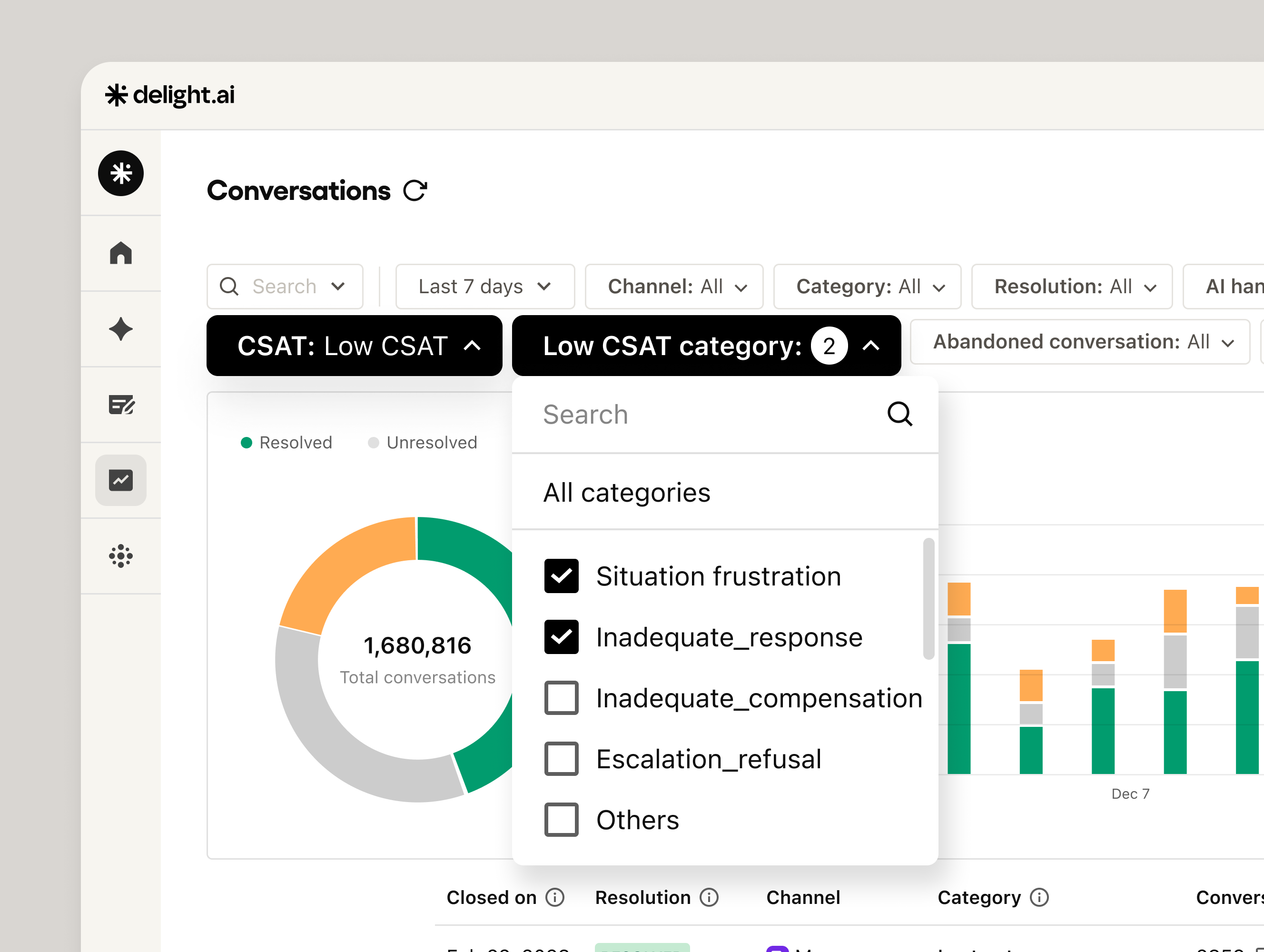
Every AI team tracks CSAT. Almost none of them know what's actually causing the low scores. Low CSAT Analysis reads every 1–2 score conversation and categorizes it into one of five failure types: Inadequate Response, Inadequate Compensation, Escalation Refusal, Situation Frustration, and Others.
Thinking Messages
Replace the typing indicator with something actually useful
When your AI agent is mid-task — looking up an order, checking a policy, calling a tool — what does the customer see? For most deployments: a generic typing indicator. Thinking Messages replaces that with configurable per-tool text and a shimmer animation that tells users exactly what the agent is doing in real time.
"Checking your order status..." "Reviewing your account history..." The message is tied to the specific tool call — accurate every time, not a generic fallback.
Control
Actionbook Editor
Edit your AI's rules like a doc. No engineering required.
Actionbooks get long. Fast. A refund threshold changes. A new product launches. Legal updates the cancellation policy. Your AI needs to know — today, not next sprint.
Actionbook Editor opens inside Workspace Settings as a structured document — sections for behavioral rules, global actions, and conditional blocks — editable by anyone on your team without a line of code.
A/B Testing & Gradual Rollout
Stop deploying AI changes on faith. Test them on real traffic.
Gradual Rollout lets you expose changes to a controlled slice of real traffic — 5%, 10%, 25% — with the ability to pause or roll back at any point. A/B Testing runs two versions of your agent simultaneously and measures which performs better on your KPIs. Statistical confidence, not gut feel.
Staging Environments
The missing layer between dev and production
Every software team knows you don't test in production. But most AI teams do exactly that — not because they want to, but because there's been nowhere else to test. Staging for AI agents mirrors your production environment exactly — same integrations, same data flows, same tool connections — but stays completely isolated from live customers.
The deployment path is enforced: Dev → Staging → Production. There's no route that bypasses it.
Continuous improvement
Zero-Touch Improvement
Your AI gets better while you sleep
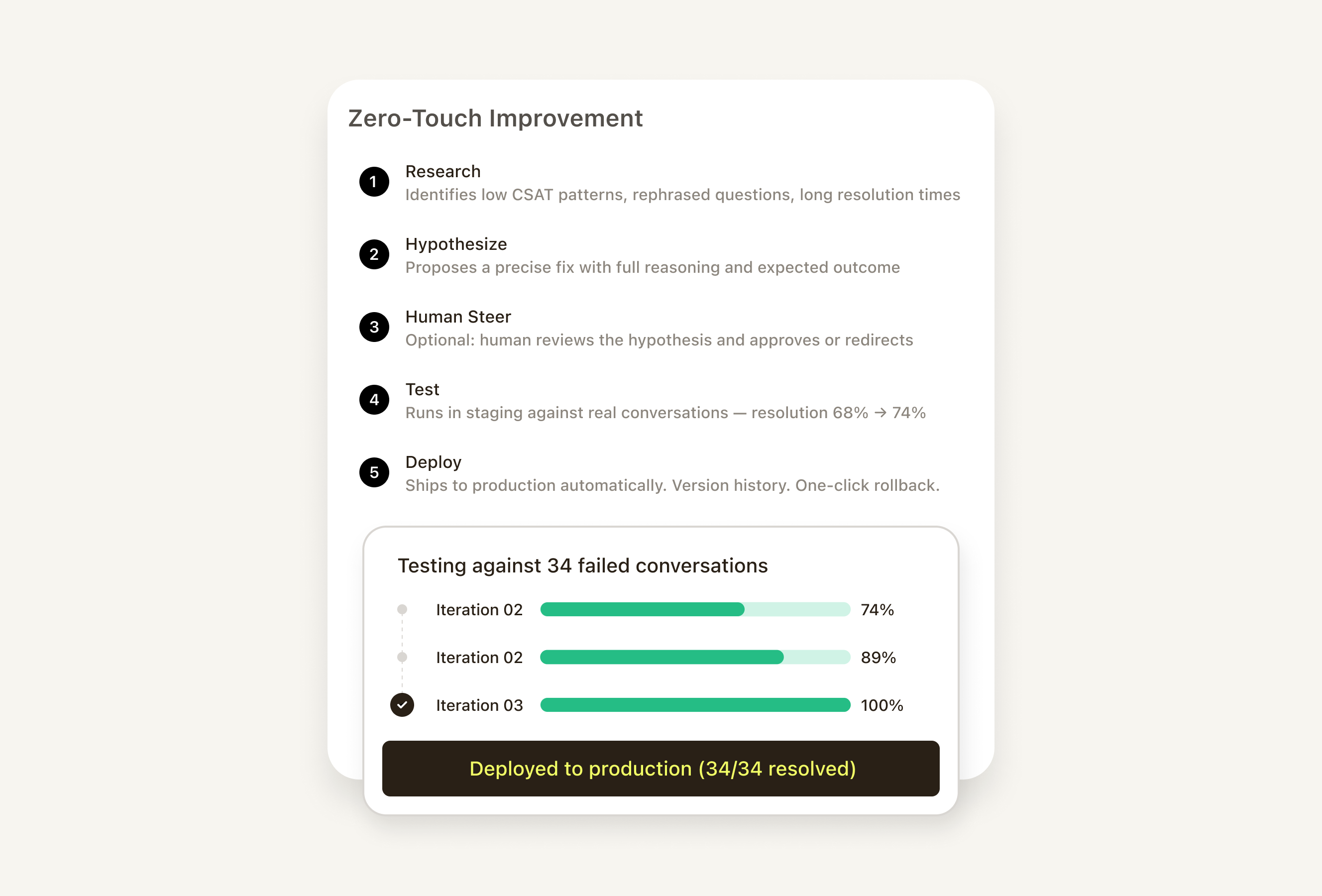
Most AI improvement today is manual: find the failure, diagnose the cause, write the fix, deploy, repeat. Zero-Touch Improvement closes the loop automatically — a graduated system with three levels you choose based on how much trust you've built:
Test Upgrade
Build test cases from real conversations. Not hypotheticals.
A test suite is only as good as the scenarios it covers — and most test suites are built from imagined edge cases, not the real patterns your AI encounters every day. The upgraded Test tooling lets teams pull directly from real customer conversations to build test cases. Organize with labels, share sets across dev/staging/production, and when tests fail, get actionable analysis — not just "failed" but exactly why and what to change.
What's next
Trust OS 2.0 is available now for all delight.ai customers. These eight capabilities ship as part of the platform — no separate contracts, no add-on pricing.
If you're already running delight.ai, your team can start with the features most relevant to where you are today. If you're evaluating, this release is a good representation of the kind of operational depth we build into the platform.
See Trust OS 2.0 in action. Talk to our team for a walkthrough.